
How to Track ChatGPT Traffic in GA4 (and Why It Undercounts)
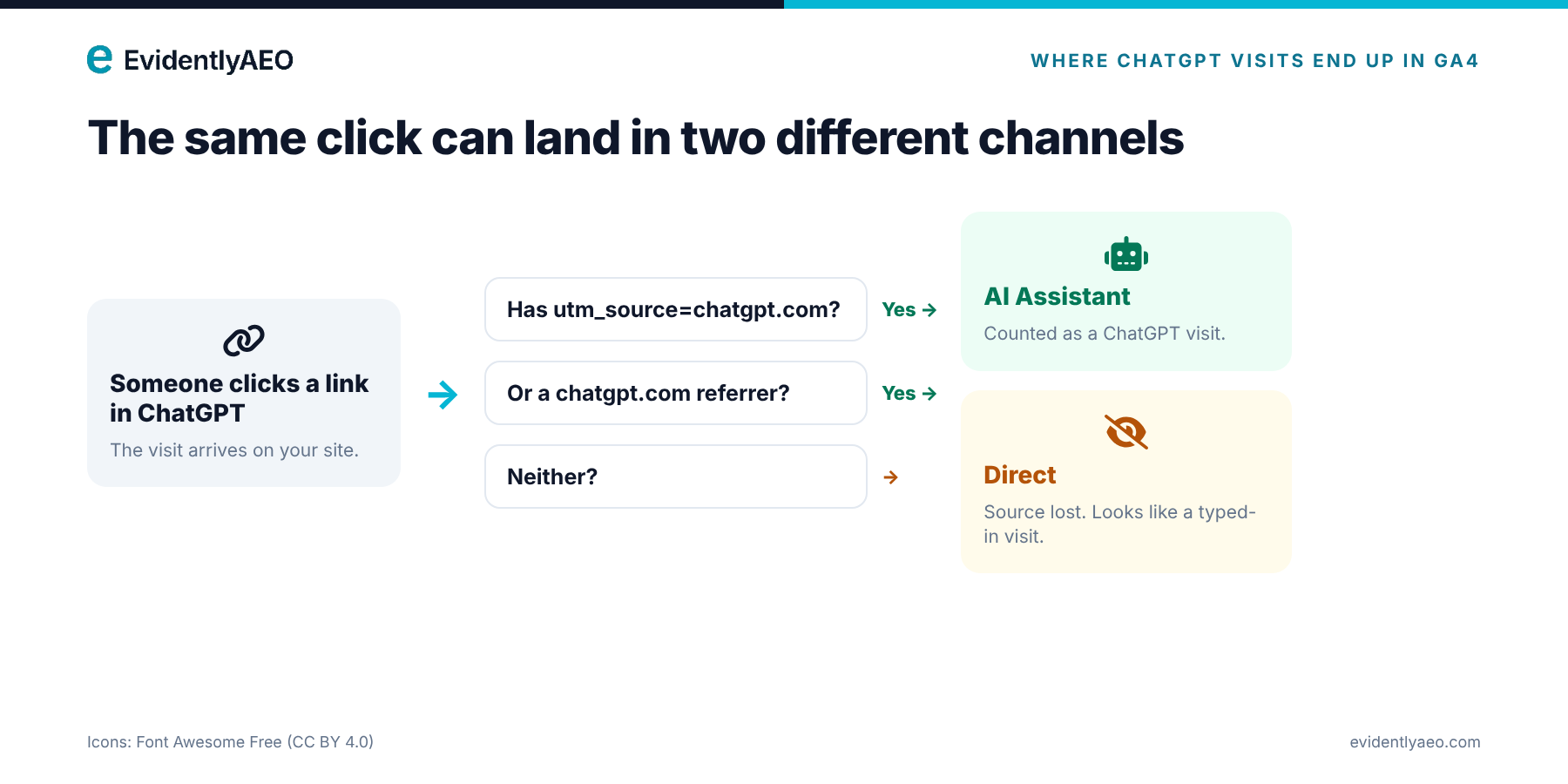
ChatGPT traffic usually looks tiny in Google Analytics 4, but that is often a measurement problem rather than a traffic problem. A large share of visits from ChatGPT arrive without a tag or a referrer, so GA4 files them under Direct. This guide shows where to find ChatGPT traffic in GA4, why it is undercounted, what happened in October 2026, and the five-step setup we use on our own site.
Where ChatGPT traffic shows up in GA4
GA4 can recognise a visit from ChatGPT in two ways:
- A tracking tag. ChatGPT adds
utm_source=chatgpt.comto many of the links it shows. GA4 reads the tag and records the visit as coming from chatgpt.com. - A referrer. When the browser passes on the page the visitor came from, GA4 can see chatgpt.com as the referring site.
When a visit has either signal, GA4 groups it into the AI Assistant channel, alongside visits from tools such as Perplexity and Gemini. When a visit has neither, GA4 cannot tell where it came from and records it as Direct.
Why GA4 undercounts ChatGPT traffic
Three things push real ChatGPT visits into Direct:
- Links without a tag. Not every link ChatGPT shows carries the tracking tag.
- Links without a referrer. Links that open in a new tab or from the ChatGPT apps often pass no referrer.
- Copied links. A user who copies a URL from an answer and pastes it into the browser leaves no trace at all.
There is a fourth, quieter problem: your own campaigns can drown out the signal. On our site, clicks from our email campaigns were being recorded as referrals from the email tool's link-tracking domain. They added up to hundreds of sessions a month with almost no engagement, which made AI traffic look irrelevant next to them.
What happened in October 2026
Between 8 and 15 October 2026, many sites saw ChatGPT sessions in GA4 fall sharply while Direct traffic rose. Search Engine Journal reported drops of 22% to 57% on sites with meaningful AI Assistant traffic. The likely cause was that links inside ChatGPT answers stopped carrying the utm_source=chatgpt.com tag and a referrer during a model rollout. OpenAI reportedly confirmed a bug on 14 October, and a fix began rolling out on 15 October (Scalevise).
The lesson is not about one bug. ChatGPT attribution in GA4 depends on a tag that can change without notice, so you need a setup that shows you when it breaks.
If your ChatGPT traffic dipped in mid-October: add an annotation for 8–15 October in your reports, and do not cut content or budgets based on that week.
Our own numbers
Here is what GA4 showed for evidentlyaeo.com over the 28 days from 28 September to 25 October 2026:
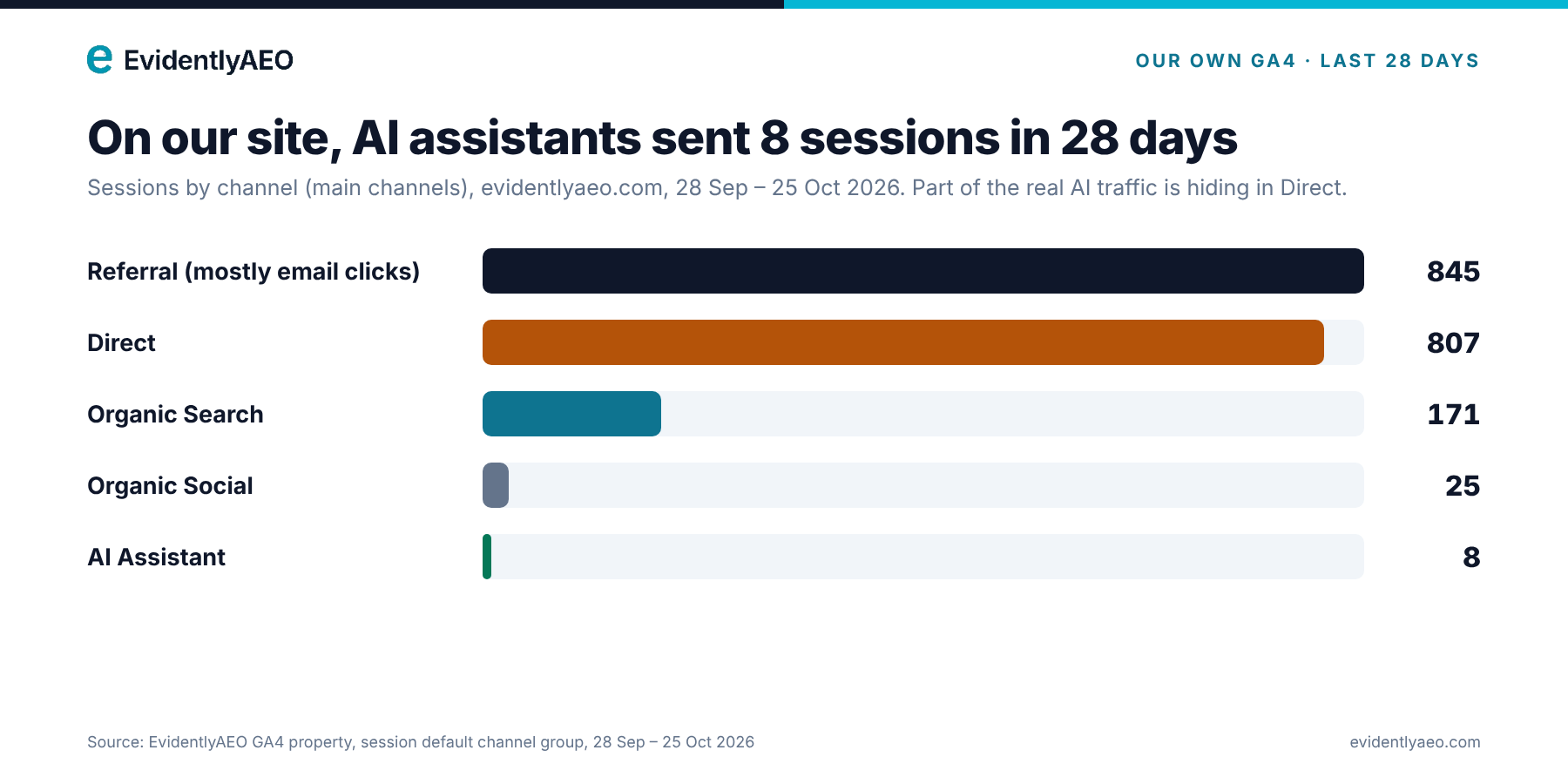
Figure: Sessions by channel on evidentlyaeo.com, 28 Sep to 25 Oct 2026: AI Assistant brought 8 sessions
- Referral (mostly email clicks): 845 sessions, 33 engaged
- Direct: 807 sessions, 381 engaged
- Organic Search: 171 sessions, 94 engaged
- Organic Social: 25 sessions, 11 engaged
- AI Assistant: 8 sessions, 4 engaged
Two things stand out. Our AI Assistant traffic is small, which is normal for a young site, and it fell from 13 sessions in the 28 days to 20 October to 8 in this window, which overlaps the October tracking issue. And part of our real AI traffic is almost certainly sitting inside those 807 Direct sessions. When we first tried to clean up the email referrals by telling GA4 to ignore the email tool's link domain, those clicks moved into Direct instead, which made Direct even harder to read. The real fix was tagging the emails themselves, which is step 4 below.
How to track ChatGPT traffic in GA4: 5 steps
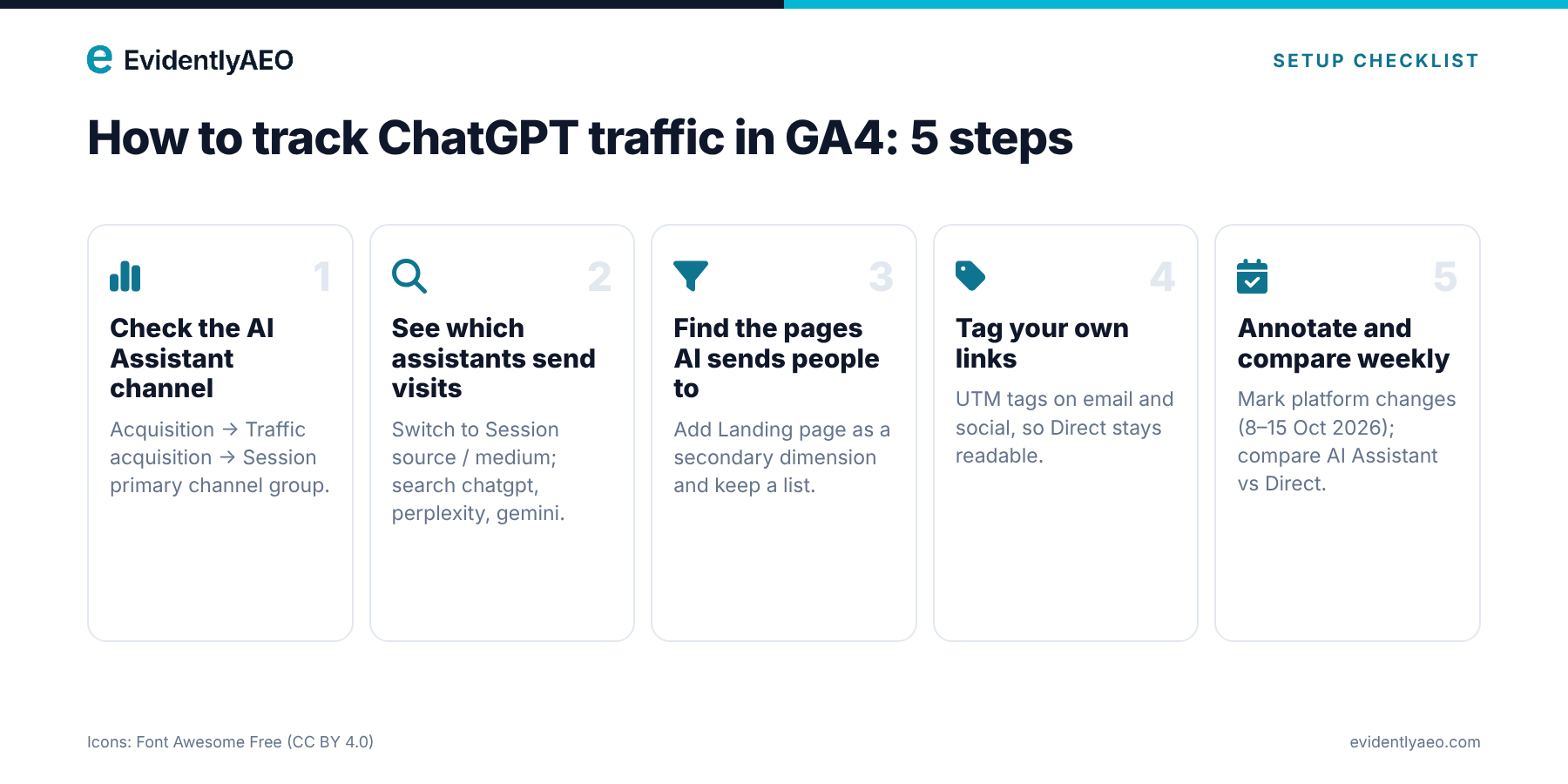
Figure: The 5-step setup for tracking ChatGPT traffic in GA4
1. Check the AI Assistant channel. Go to Reports → Acquisition → Traffic acquisition, and set the table to Session primary channel group. Look for the AI Assistant row. This is your baseline.
2. See which assistants send visits. In the same report, switch the dimension to Session source / medium and search for chatgpt. Then try perplexity, gemini, copilot and claude. Each one is listed separately, so you can see which assistant sends the visits.
3. Find the pages AI sends people to. Add a secondary dimension of Landing page + query string. Pages that get AI visits are usually guides, comparisons and answer pages. Keep a list, because these are the pages to keep accurate and up to date.
4. Keep Direct clean by tagging your own links. Add UTM tags to every link you control: email campaigns, social posts and partner links. In most email tools this is a single setting. Once your own traffic is tagged, a jump in Direct to a page that AI often cites is a strong hint of untagged AI visits.
5. Annotate and compare every week. Add annotations when an AI platform changes (like 8–15 October), and compare AI Assistant and Direct traffic for your top AI landing pages every week. If AI Assistant falls while Direct rises on the same pages, it is probably a tracking change, not lost visitors.
Traffic is only half the picture
Even perfect tracking only counts the people who click. Most people who ask ChatGPT about your category read the answer and never visit a website. To know whether ChatGPT recommends you, which competitors it names instead, and which sources it trusts, you have to measure the answers themselves. That is what EvidentlyAEO does: it tracks what ChatGPT, Gemini, Perplexity, Claude and other AI engines say about your brand, every day. See how it works.
Frequently asked questions
Can GA4 track ChatGPT traffic? Yes, when the visit carries the utm_source=chatgpt.com tag or a chatgpt.com referrer. Visits with neither are recorded as Direct.
Why did my ChatGPT traffic drop in October 2026? Most likely a tracking issue. Between 8 and 15 October, many ChatGPT links lost their tracking tag and referrer, so visits were counted as Direct. A fix began rolling out on 15 October.
What is the AI Assistant channel in GA4? A channel in GA4's default channel grouping that collects visits from AI assistants such as ChatGPT, Perplexity and Gemini.
How do I stop email clicks showing up as referrals? Tag your email links with UTM parameters (most email tools do this with one setting), so GA4 records them as email rather than as a referral or Direct.


